How do you figure out what the best backup software is for your servers or workstations? There are dozens, if not hundreds, of backup software applications out there, so it can be overwhelming.

Or you can just take our advice, since we’re IT professionals and we created this site!
For most environments, we recommend Veeam Backup & Replication. Veeam Backup & Replication runs on a physical computer or virtual machine. It will connect to all your other computers and “automagically” back them up.
Veeam, a Swiss-based company, was founded in 2006, specializing in backing up and monitoring VMware virtual environments. Since then, they’ve rapidly expanded to over 2,000 employees and offer a whole host of backup and disaster recovery-related tools. But Veeam Backup & Replication (VBR), which backs up VMware, Hyper-V, and bare metal servers and workstations, is still their bread and butter product and can deploy and manage many of their other products. They also offer Veeam Enterprise Manager and Veeam Availability Console, which are great for managing multiple sites and VBR installations.
People love Veeam because it’s fairly easy to use and get the hang of, but it’s also extremely powerful, robust, and reliable.
As an IT managed service provider, we learned the basics of Veeam Backup & Replication and got it installed in a matter of a few days. Of course, it took us a bit longer to understand the inner workings in more depth, and we still learn new things every day about it! But in general, it’s pretty easy to use.
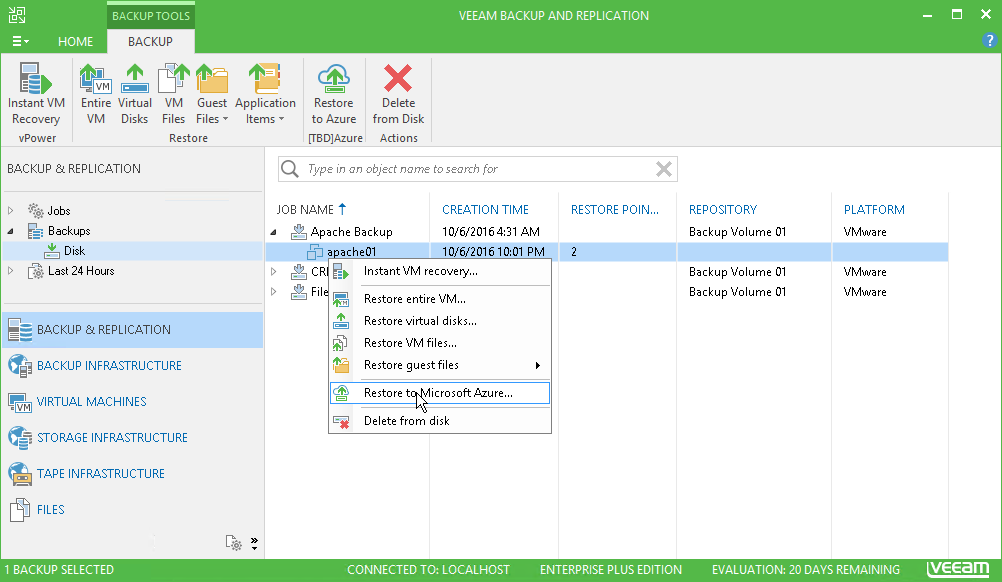
With VBR, you can even restore a bare-metal server or workstation, or a virtual machine, to Microsoft’s Azure cloud! Here’s a screenshot of the VBR interface showing Restore to Azure… option.
Here’s what one IT systems administrator had to say about Veeam: “Simply the best backup solution on the market; nothing else comes close to the vast range of features Veeam offers that make the backup and restore process seamless. Veeam is a product that just works and does what it says it will do.”
Pricing
Veeam Backup & Replication is not incredibly expensive, but not cheap either. It’s priced per CPU socket and there are three editions Standard, Enterprise, and Enterprise Plus. At the time of this writing, in October, 2018, the pricing is:
- Standard — $750 per CPU socket
- Enterprise — $1,500 per CPU socket
- Enterprise Plus — $2,250 per CPU socket
You can visit this page for a breakdown of what’s included in each edition.
How to save money on Veeam backup software
Don’t want to pay that much for backup software? I don’t blame you. There’s a way around that.
If you work with a Veeam Cloud Service Provider (VCSP), they can lease you the licenses on a per-VM or per-server basis. For as little as $15 per VM per month, you can have the full Backup & Replication software and features. Many VCSPs have their own datacenter or cloud environments and can even offer you a cloud or offsite backup option, which is essential.
You can find a Veeam Cloud Service Provider here.
Conclusion
If you’re looking for extremely powerful, robust, and reliable backup software for both bare-metal servers and virtualized environments, Veeam should be on your short list. We love it, use it with our clients over at InstanTek, and highly recommend it.
